Assigning Transactions to Categories
Assigning Transactions to Categories
Once your transactions are in ApariPro, you can allocate them so that they end up in the correct box of the tax return.
This helps you stay on top of your income and tax-deductible payments, such as business expenses, charitable donations and pension contributions.
You can do this from the Record Keeping area. Simply select a transaction and you’ll see the screen below:
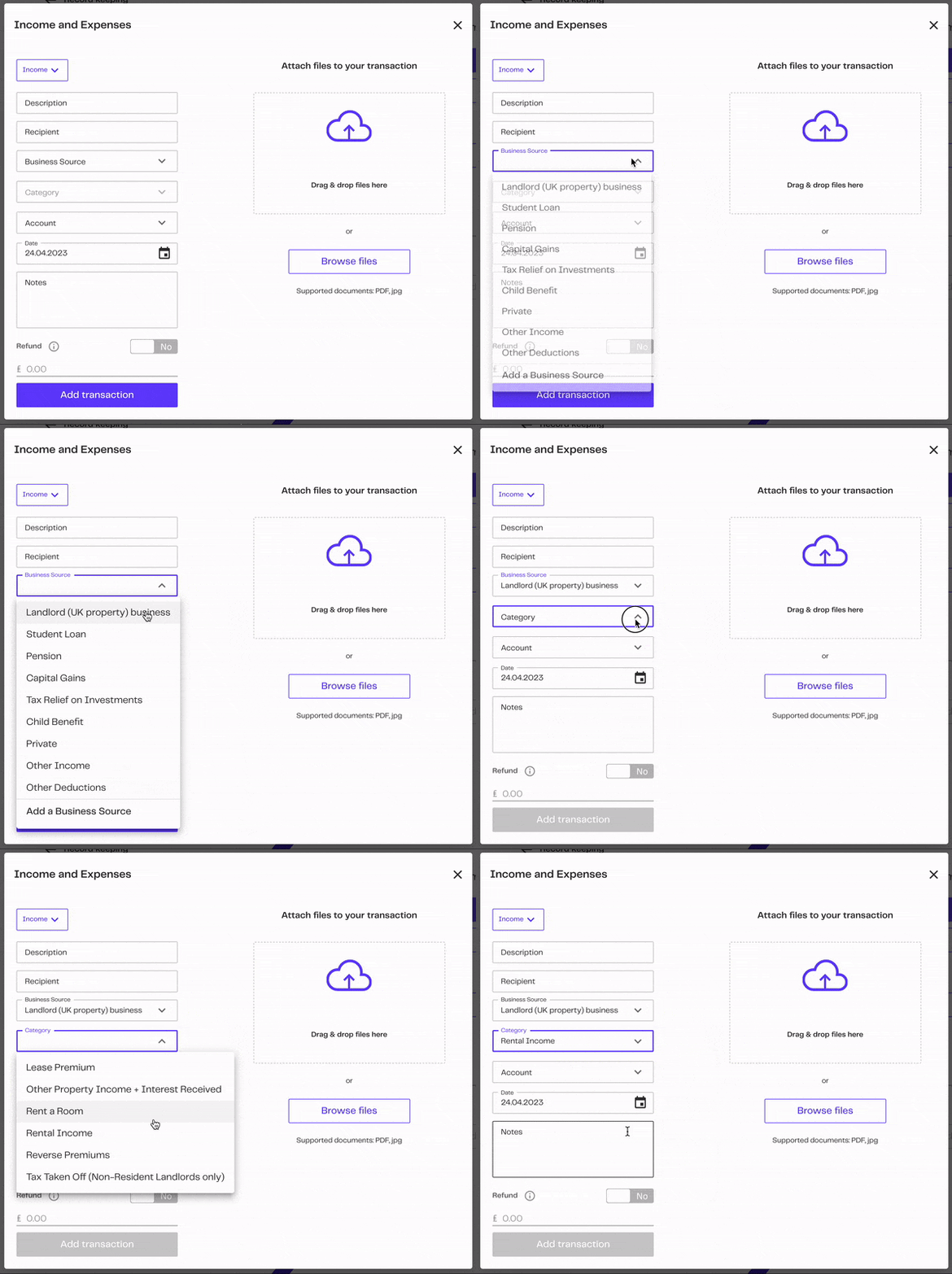
WE HAVE A FEW TOOLS TO MAKE THIS EVEN EASIER:
Filtering your transactions e.g. by date, bank account, or search.
Categorise in bulk e.g. assign all fuel costs as a business expense in a few clicks.
Split a transaction e.g. split a single bank transaction from a letting agent into the gross rent and their management fee.
Delete or mark as private e.g. if your bank feed has transactions that aren’t relevant for tax, you can easily remove these from ApariPro.
Related Articles
Attaching receipts, invoices or statements
Attaching receipts, invoices or statements We make it easy to keep all of your tax return information together in ApariPro. This includes the ‘Snap and Store’ feature: it allows you to attach files, like photos, scans and documents, to your ...Allowable business expenses
Allowable business expenses You can include many expenses in your tax return - alongside your business income - to reduce the amount of profit you pay tax on. The general rule is that the expenses must be wholly and exclusively for this business. ...Allowable Landlord expenses
Allowable Landlord expenses You can include many expenses in your tax return - alongside your rental income - to reduce the amount of profit you pay tax on. The general rule is that the expenses must be wholly and exclusively for your property rental ...Reviewing your transactions
Reviewing your transactions If your Record Keeping area is growing and growing, well done! It means you’re staying on top of your finances. By default, we show all transactions and sort them by date, with the most recent transactions at the top. To ...Adding a business or rental properties
Adding a business or rental properties A single ApariPro account covers your entire Self Assessment tax return. So you can handle rental properties, multiple self-employed businesses and an employed job all in one place. You’ll still be able to see ...